Research · Published August 21, 2026 · Updated August 26, 2026
PDF field detection: What broke across 23 real forms
This is a technical look at our work on pdf2fill's field detector: what broke across 23 real PDF forms, what we learned, and which fixes held up under measurement. The detector found 1,719 of 2,130 annotated fields. The average hides a much messier result: one document scored 0.9944 F1, another scored 0.1250, and the government and tax subset landed at 0.6397.

The result
0.8506 micro F1, with a 0.7425 document average
Across 23 documents, the answer key contains 2,130 fields. The detector returned 1,912 predictions: 1,719 true positives, 193 false positives, and 411 false negatives. A match required at least 0.50 intersection over union (IoU) on the same page.
Micro F1 pools every field, so a 356-field document can move it sharply. Macro F1 gives each document equal weight. The 0.1081 gap between them is the warning label: performance varies more by document than the headline number suggests.
Public baseline
A model we didn't train beats this detector on 17 of 23 documents
A benchmark of your own work is worth very little without something to compare against. There is a public baseline for this exact task: CommonForms (Joe Barrow, September 2025), a form-field detection dataset of roughly 55,000 documents and 450,000 pages filtered from Common Crawl, with two trained models released for free.
So we ran both of them over the same 23 documents, scored against the same answer key, by the same one-to-one matcher, at the same IoU 0.50, with field types ignored on both sides. FFDNet ran at the settings its own package uses by default. Neither model has seen this corpus.
| Metric | pdf2fill | FFDNet-S | FFDNet-L |
|---|---|---|---|
| Micro F1 | 0.8506 | 0.8026 | 0.8465 |
| Macro F1 | 0.7425 | 0.8175 | 0.8681 |
| Precision | 0.8991 | 0.9499 | 0.9476 |
| Recall | 0.8070 | 0.6948 | 0.7648 |
| Government and tax subset | 0.6397 | 0.8390 | 0.8581 |
| Micro F1 without patient intake form A | 0.8196 | 0.8536 | 0.9010 |
pdf2fill now narrowly leads FFDNet-L on pooled micro F1, 0.8506 to 0.8465, and on recall. FFDNet-L still wins macro F1, precision, the government and tax subset, and the score with patient intake form A removed. It also beats this detector on 17 of 23 documents, so the narrow pooled win does not erase the per-document gap.
The gap is widest exactly where it hurts most. On the W-9, FFDNet finds all 23 fields with no false positives (1.0000) where we score 0.4364. Bank direct-deposit form B: 0.9167 against our 0.1429. IR330: 0.7500 against our 0.1250. Patient intake form C improved from 0.0526 to 0.7130, but FFDNet-L still reaches 0.8645.
Our two clearest wins remain patient intake form A (0.9944 against 0.4483), where the glyph checkbox work pays off, and power of attorney (0.8706 against 0.5614). Our recall is higher than both FFDNet models overall; both FFDNet models remain more precise.
One practical note for anyone reaching for these models: FFDNet-S and FFDNet-L run through Ultralytics, which is AGPL-3.0, and the CommonForms repository declares no licence at all. That makes them awkward inside a hosted product, whatever the scores say. Their third model, FFDetr, is the Apache-licensed one, and at version 0.2.1 it crashes on any single-page PDF, so it isn't measured here.
Method
What counted as a detected field
We drew a rectangle around each fillable region on the pages a user would complete. Instruction-only pages weren't annotated. The evaluator paired predictions and truth rectangles one to one on the same page, then counted a pair as a match when its IoU reached 0.50.
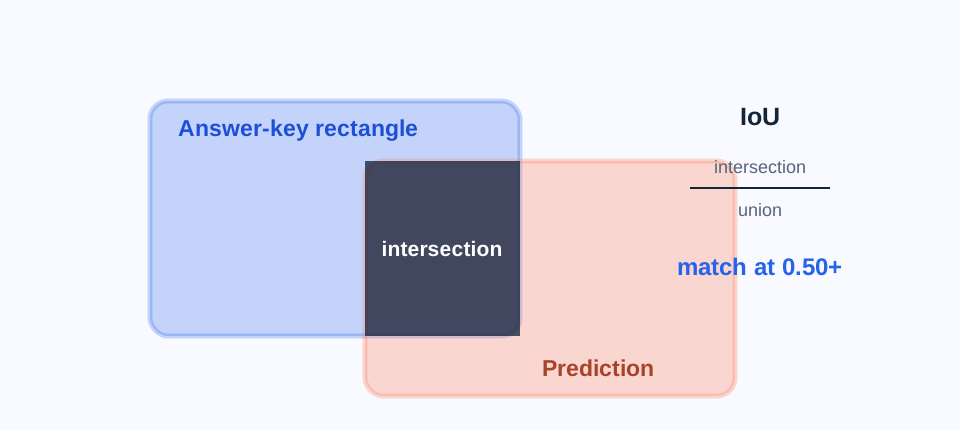
The score is geometry-only. Field type is ignored, and F1 is the harmonic mean of precision and recall. We omit type accuracy because eight documents still carry generic, unreviewed type labels.
Prior work exists and we didn't invent this problem. CommonForms is the large public dataset, and AutoFormBench (Northern Kentucky University, 2026) annotates 407 forms to compare OpenCV against four YOLO architectures. Ours is a much smaller corpus with hand-drawn rectangles, and its value is the per-document detail rather than scale.
The corpus is a committed regression set rather than an unseen test. 20 documents are development documents. The other three form a committed validation subset, which means they are visible to the test gate. A separate unseen holdout exists outside the repository, but it hasn't been scored for this article.
Several official PDFs were flattened before annotation. In normal use, pdf2fill reads existing AcroForm fields directly when they are present. This benchmark removes that easier path and measures only the fallback detector for digital pages made from text, lines, vector shapes, and embedded raster elements.
Failure map
A blank line can use six visual primitives
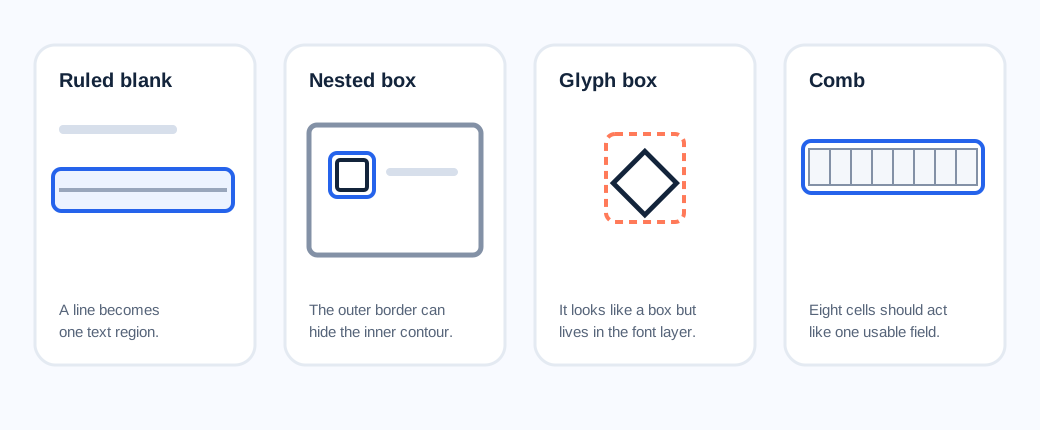
A person sees a place to type. A PDF may encode that place as underscores, a horizontal rule, a bordered rectangle, nine adjacent comb cells, a box nested inside a larger border, or a font glyph that only looks like a checkbox.
Rules and underscores were the easy half
The original detector was strongest on underscore runs and ordinary ruled blanks. Documents built around those marks commonly scored from the high 0.70s into the 0.90s. That success didn't transfer cleanly to bordered cells and combs.
Some checkboxes were hidden inside bigger contours
An early contour pass kept only the outside edge of a connected shape. Small checkboxes nested inside a form border disappeared before classification. Reading the contour hierarchy recovered 46 true positives on the development documents, with no new false positives, in a round that moved overall F1 from 0.7312 to 0.7510.
Higher resolution couldn't turn a diamond into a square
One 356-field patient intake document contained 251 checkbox annotations. The raster checkbox pass found none at 150, 225, 300, or 450 DPI. At 300 DPI, an isolated diamond covered 60.9% of its bounding box, below the square detector's 85% extent floor. Of the 251 checkbox annotations, 248 sat on lozenge characters in the text layer.
An allow-listed glyph pass later recovered all 251 on that targeted document, plus 32 more across two other documents. The full-corpus change added 283 true positives and four false positives, with no per-document F1 regression. That document was a development case, so it isn't independent evidence of generalization.
Comb fields forced an annotation decision
A row of nine character cells can be annotated as nine boxes or as one field with nine positions. The product needs the second version: one place to type the full value. We changed the answer-key convention to one field per contiguous comb run, even though the detector still emitted individual cells. That made the answer key more useful and made the weak score more visible.
Labels can live inside the box
Some intake forms print a caption inside the same bordered area where the answer belongs. A filter designed to reject boxes containing text then rejects the input itself. The geometry alone can't reliably tell whether the text is a label, a filled answer, or ordinary table content.
What we rejected
Two plausible fixes failed measurement
Rendering the 4-page patient document at higher DPI raised peak memory from 147 MB at 150 DPI to 582 MB at 450 DPI. Checkbox recall stayed at zero. The problem was shape, so extra pixels only made the same mistake more expensive.
We also widened the accepted band for long labelled rules. The broad variant found six more true fields and added 23 false positives, reducing overall F1 from 0.7510 to 0.7474 with regressions on five documents. A left-label-only variant added one true positive and one false positive, barely moving F1 to 0.7511. Both variants were dropped.
Answer-key defects
A correct box can fail against a wrong rectangle
On an anonymized bank direct-deposit form, nine drawn checkboxes measured 9.24 by 9.24 points. The hand-drawn truth rectangles measured 16.50 by 14.00 points, 170.6% more area. The actual vector box reached only 0.3696 IoU against that truth, so a geometrically correct detector couldn't cross the 0.50 match threshold.
We corrected those nine rectangles from the PDF's vector content, not from detector output. The unmodified engine's score stayed exactly the same because it had missed all nine boxes before and after. A second mechanical audit later snapped 34 noisy checkbox annotations on another development form. Its IoU-0.50 score stayed unchanged, while its stricter IoU-0.75 F1 moved from 0.38 to 0.78.
That audit matters because tuning against a hand-labelled corpus can optimize both the detector and the mistakes in its answer key. Corrections need an independent geometric source and a before-and-after score for the untouched engine.
Development sensitivity
The biggest win was also the most targeted
Patient intake form A contributes 356 annotated fields, 16.7% of the whole corpus. We diagnosed its checkbox glyphs directly and built the glyph pass against that failure. Its final score is 0.9944 F1.
Removing that one document leaves 22 documents and 1,774 annotated fields. Micro F1 falls from 0.8506 to 0.8196. We publish both figures because the lower one better shows how much the headline depends on a targeted development case.
All documents
Results, worst first
Small documents move in coarse steps. IR330 has eight annotated fields, so one match changes recall by 0.125. Private and restricted sources use neutral labels throughout this page and the public data file.
| Document | Category | Fields | Precision | Recall | F1 |
|---|---|---|---|---|---|
| New Zealand IR330 | Government and tax | 8 | 0.0833 | 0.2500 | 0.1250 |
| Bank direct-deposit form B | Banking | 13 | 1.0000 | 0.0769 | 0.1429 |
| IRS W-9 | Government and tax | 23 | 0.3750 | 0.5217 | 0.4364 |
| HMRC Starter Checklist | Government and tax | 45 | 0.4203 | 0.6444 | 0.5088 |
| Bank direct-deposit form A | Banking | 39 | 0.6875 | 0.5641 | 0.6197 |
| France Cerfa 13750 | Government and tax | 138 | 0.9589 | 0.5072 | 0.6635 |
| Patient intake form C | Medical intake | 71 | 0.9318 | 0.5775 | 0.7130 |
| Deposit receipt | Business form | 30 | 0.6136 | 0.9000 | 0.7297 |
| Canada TD1 | Government and tax | 31 | 0.7931 | 0.7419 | 0.7667 |
| Patient intake form D | Medical intake | 63 | 0.9762 | 0.6508 | 0.7810 |
| Bid proposal | Business form | 104 | 0.9730 | 0.6923 | 0.8090 |
| Residential lease | Real estate | 229 | 0.8929 | 0.7642 | 0.8235 |
| IRS W-4 | Government and tax | 48 | 0.8636 | 0.7917 | 0.8261 |
| Contractor invoice | Business form | 125 | 0.9174 | 0.8000 | 0.8547 |
| Power of attorney | Agreement | 41 | 0.8409 | 0.9024 | 0.8706 |
| Car rental agreement | Agreement | 83 | 0.9315 | 0.8193 | 0.8718 |
| U.S. Court AO 240 | Government and tax | 31 | 1.0000 | 0.7742 | 0.8727 |
| Patient intake form B | Medical intake | 176 | 0.9793 | 0.8068 | 0.8847 |
| Investor agreement | Agreement | 112 | 0.9252 | 0.8839 | 0.9041 |
| Independent contractor agreement | Agreement | 135 | 0.9675 | 0.8815 | 0.9225 |
| Work-for-hire agreement | Agreement | 120 | 0.9914 | 0.9583 | 0.9746 |
| Collaboration agreement | Agreement | 109 | 0.9907 | 0.9725 | 0.9815 |
| Patient intake form A | Medical intake | 356 | 0.9889 | 1.0000 | 0.9944 |
Download the public benchmark data (JSON). Ground-truth SHA-256: c67439f5fc9013cbdbbf283b4a2e29623bd20a52af501e622fab6ad563b5d9b4.
Limits
What these numbers don't cover
- The corpus is private. Its committed hashes, counts, evaluator, and derived results are auditable, but outside readers can't reproduce the benchmark without the source PDFs.
- The benchmark measures the flat-digital fallback. It doesn't measure AcroForm extraction, OCR, image-only scans, or PDFs outside these 23 documents.
- The documents weren't sampled randomly. The set grew from available forms and known failure styles. Twenty documents were used for development, and the three committed validation documents are visible to the regression suite.
- Field types aren't scored here. Eight documents use generic, unreviewed type annotations, so a geometry match doesn't prove the correct input type.
- IoU 0.50 forgives some edge error. IoU 0.75 is more sensitive to small cross-platform coordinate shifts, so we use the threshold where all three committed platform floors agree exactly.
Where this leaves the product
The failures are now specific enough to work on
The next detector work is specific: merge comb cells into usable inputs, handle labels inside bordered cells, and distinguish long write-in rules from table furniture without reopening the false-positive flood.
The benchmark also changed how we judge improvements. A corpus score needs its per-document distribution, development history, annotation corrections, and rejected experiments beside it. Without those, 0.8506 looks more settled than it is.
If you have a flat digital form and want to see where the current detector succeeds or misses, you can try the PDF form filler. Manual field placement remains available when the fallback gets the geometry wrong.